AI Agent vs Chatbot: What’s the Difference for Your Store?

What better way to stand out from the competition than by using image optimization and presenting an enticing photo of your product?
Product images are not sufficient to entice customers. You need to optimize images for conversions.
According to a survey by Weebly, shoppers who can see product images are 75% more likely to purchase them. Even if your visitors aren’t specifically looking for a specific product, they might still purchase if you give them enough product images for reference.
You might have heard the term “image optimization” before, but have you wondered what it actually means? Why image optimization is important?
It’s said that a picture is worth a thousand words. Hence, visual content plays an important part in the website and marketing of your brand to attract visitors and customers.
To start with a simple explanation, image optimization is the process that includes the use of various techniques to deliver high-quality images in the proper format, dimension, size, and resolution while maintaining the smallest size possible.
For example: Let’s say you have an image of a dress and you want to display it on your website. You could upload the original, full-sized image and display it on your website; but this would take up a lot of space—not only on your site but also in the visitor’s browser cache.
If you upload a small version of the same photo (say, 2 megapixels instead of 4), then less space is used on the site. But visitors might notice some pixelation or blurriness when viewing the image. That’s where product image optimization comes in!
By using various image editing tools, you can reduce the file size of your photos without affecting their quality. Using an extension improves loading time for visitors viewing your site on slow connections.
If you’re trying to market a product or service, it’s important to understand that the images you use are critical to your success. Visual content conveys meaning, build trust, and even increase sales and conversion.
Optimized images are just as important as text on a page for conversion optimization. They convey information about a product or service in a way that’s visually appealing and easy to understand.
When creating optimized images for your website, it’s important not only that they look good but also that they are effective at conveying their message.

As per the cart abandonment analysis by Cloudways, the global cart abandonment rate is around 76%. More than three-quarters of online buyers won’t even return to your website because of poor site usability, excessive load times, and low-quality product photos and videos that don’t give a compelling depiction of the products.
Let’s have a look at different ways in which image optimization affects website performance:
Image optimization is a process that allows you to reduce the size of your images without losing any quality. This is important because it will help your website load faster to provide a smooth user experience. As per the cart abandonment analysis and a survey by Unbounce with 525 respondents, nearly 70% of consumers abandon cart due to page speed which further influences their decision to make the purchase.

As you probably know, images are one of the most important elements of a website. They provide users with a glimpse of the product (what it looks like). But if you have too many large images on your site, it can slow down its load time—which is something that no one wants!
That’s why product image optimization best practices are important as it lets you keep high-quality images while making sure they don’t slow down your site too much.
In today’s world, it is more important than ever to use image optimization best practices to improve search engine rankings.
Many factors are included in the image conversion optimization process. For example, filling out the alt text for an image, internal anchor texts, and use of descriptive texts when linking to images among others.
Google and other search engines use images to rank pages. Thus, image optimization ensures that the images on your page are optimized for search engines. This means they should be named appropriately and should not be too large. Ensure that the text on each image matches what’s written around it (or at least makes sense).
Image optimization best practices improve user experience by loading images faster. If the image loads slowly or has performance issues, users will see this as a sign of a poor website.
This can further make them lose trust in the brand. Using product image optimization techniques like compression, you can ensure that your images load quickly, improving your user experience and making your website seem more professional.
Bounce rate is a metric that measures the number of visitors who leave your site after viewing only one page. The higher the bounce rate, the less effective your content is for your users.
Image optimization decreases bounce rate by making sure that your website loads quickly. If you have images that are larger than necessary or contain unnecessary information, it can cause your site to take longer to load.
This can cause visitors to leave before any content on your site and increase your bounce rate. Optimizing these images can decrease the time it takes for your site to load, increasing user satisfaction and reducing bounce rate.
Image optimization directly affects conversions because it influences the loading speed of the website (i.e. makes the website load faster). This can be the difference between a user clicking on your ad or clicking on the next one in their feed. If there’s even a slight delay, it could mean that they’re gone forever.
Another way that image optimization design leads to higher conversions is by ensuring that the right images are shown on mobile devices where the screen size is much smaller than on desktops. If you don’t optimize your images, they might not show up!
The bottom line? Unless you want to lose out on potential customers—and potentially alienate those who already visit your site—you need to optimize every image!
Product images greatly influence traffic and sales. That’s why even if you hire the best designer in the world to build an attractive design if the quality of the image is poor, it will surely affect sales.
Product images are a vital part of any marketing strategy. After all, they convince users to click on “add to cart” on your site—and if you don’t have the right images, you may be missing out on a lot of potential sales.
But while it’s important to ensure that your product images are high quality and capture the essence of what you’re selling, there are also a few ways to optimize those images to perform better for you.
Here are some tips for product image optimization:
Image Zoom Options can be a great way to optimize your product images, especially if you’re trying to show off the details of your product. If you zoom in on an image, it will make the details larger and easier to see. This is especially helpful when you have small products with intricate details, such as jewelry, clothing, or other accessories.
For example, you can see below how a designer handbag company, uses zoom to let customers analyze the product online and make the decision to purchase the product.

Proceeding with the example, if you’re selling a purse, don’t just show the image of a purse. You can show someone holding it. When you visually show your product with other objects in the picture or someone holding it, it helps customers understand what they’re getting.
If you don’t have an image zoom option on your website, it can be difficult for customers to see your product’s details. This can make them feel like they don’t know enough about what they’re buying before they buy it. Hence, you want consumers to be able to enlarge a picture of a product without losing quality.
If you want to improve your Google search ranking and increase the conversion rate of your eCommerce business, you must ensure that your website is responsive and mobile-friendly. One of the most effective ways to show off the size of your product is by using props.
For example, if you are selling a dress, then use a mannequin or a model in images, so that customers can see how the dress looks when they compare it side by side.

The above shown image of a dress from an eCommerce store Etsy shows how the use of a person and options to customize it changes the overall perspective of the product. Here you can see details like the description of the product, the number of pieces sold, the option to choose a size, the number of image product reviews for the dress by the customers, add to cart option, and so on have been mentioned to make it easy for customers to decide.
Another way to optimize an image is through the use of high-quality compressed images. This will ensure a good user experience for people who visit your site on their phones or tablets.
The reason why it’s important to use high-quality compressed images is that it will help with the load time of your website so that visitors can easily navigate through it without having any issues on their devices.
When users can navigate around easier on their phones or tablets, they’re more likely to stay longer on your site, which means more sales! Also, keep consistent with your image quality throughout your product pages to reduce cart abandonment rate.

Although maintaining excellent quality is a given, consistency in size, look, feel, format, page loading, and pretty much everything else is equally important. It gives your store a more polished appearance and provides a competitive edge.
A consistent image helps create a healthy concept from a customer’s perspective during the awareness stage when a client first becomes familiar with a brand.
For example, the above-displayed image from the Ikea website shows a professional, organized, and consistent image that creates a welcoming and secure look.
Have you ever seen a product image and wondered why the photographer didn’t move the product a little to the left or maybe pulled it back a bit? Or did you notice that all of your competitors’ images have similar backgrounds and lighting?
The answer is simple: because it’s all about the product and product image optimization.
You want to showcase what makes your product unique so that when customers see it, they know it’s exactly what they want. Make sure the background is simple and overall the layout is easy to use.
You don’t want your customers distracted by things like clutter or other objects in the photo. Make sure everything is clean, organized, and neat so that all eyes focus on the product.
Showcasing more than one image is not a new idea. It helps you show different angles and views of the product, which enables users to get a feel of what it looks like in real life and understand how it would fit and be appropriate for them. The more variations of your product, the better.
As per a study by Weebly, around 22% of online products are returned because sometimes product items look different than the photos. This indicates that having multiple images gives authenticity to the product being real while maintaining trust amongst users. An image should be clear and easy to understand. This can be accomplished by ensuring that the lighting and the angle while taking the picture is correct.
Below is an example of how one product’s images from different angles can change the product’s look and feel.

Using more than one image per product will help optimize how customers and prospects view your products. When browsing, they’ll be able to see the item from different angles and realize how it might look in their home. This will encourage them to purchase more things they were previously hesitant about buying.
Your eCommerce website’s goal should not only be to increase traffic but also to sell products.
Video tutorials are one of the most effective ways to optimize your product images. They are a great way to show your company’s products in action and give customers a better idea of what they’re getting.
It also gives them a better sense of how to use the product properly and safely, which is especially important for items like power tools and other products that might be dangerous if handled improperly.
Here is an example of a video tutorial from Amazon.
If you’re selling products online, video tutorials can help you stand out from competitors by giving customers more information about how they can use your products. The best part? You can create a relevant video for any user, even if they aren’t familiar with the product.
You’ve got your product, your catchy headline, and your product description; you’ve even got a few image product reviews from customers who love your product. Now it’s time for product image optimization for mobile devices.
According to a report by OuterBox, over 79% of online shoppers use their phones to look at products and make purchases. That means that if you aren’t optimizing your photos for mobile devices, over half of the people who visit your site aren’t seeing your products.
If you want to take advantage of the fact that more and more people are shopping on their phones, your product images must be optimized for these smaller screens.
The product images should be clear and vibrant so that customers can easily see what you’re offering. Images should also be easy to navigate through so that users can find exactly what they’re looking for. If you optimize your images for mobile devices, you could retain sales.
As per Google Consumer Survey, U.S., Shopping & Visualization report 2019,

Finally, remember that there are differences between how people view images on their desktop versus how they view them on their phones and tablets. Therefore, optimizing images for each type of device is important.
Image Sitemaps help search engines index your images quickly, which means they will appear more quickly in search results. This is especially useful if you have a lot of products with similar images, as it helps search engines like Google and Bing to better understand what each image means, so they can rank your pages.
You can use image sitemaps by adding an XML file to your website with the location of all the images on your website. You can also use these files to tell search engines what the image is about—for example, if an image is of a dog, you could include the name of the dog in the XML file so that when someone searches for “dog,” it would be easier for them to find your page!
Below is an example of what a sitemap looks like:

Alt text is the name of the image’s description and is a vital part of your web page. Alt text helps search engines understand what the image is about, which allows them to index it for users.
If you don’t include alt text for your images, Google will use its algorithms to try and figure out what they are. This can lead to weird results when someone searches for a keyword related to your image.
For example, if someone searches for “blue car,” Google may show an image of a red car instead because there is no alt text for that particular image. It’s important to include alt text in every image on your website so that Google understands what each one is about and can index them properly.
The page title and meta description are two of the most important aspects of search engine optimization (SEO). Optimizing these elements can help increase the search ranking, which will in turn bring more traffic to the website.
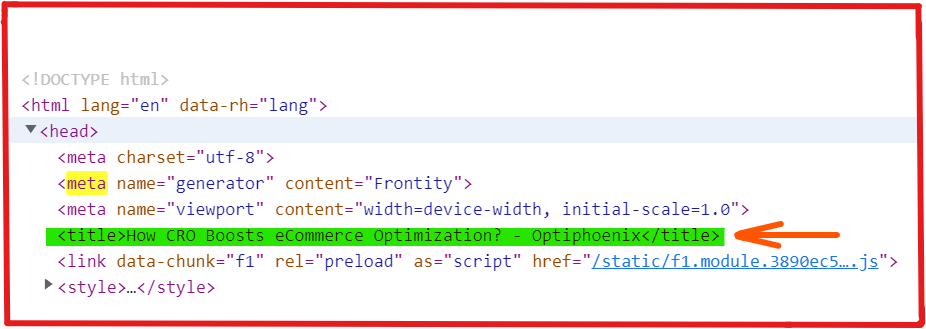
Google does not entertain plagiarised content (duplicate content). This means that blog titles and headings, product descriptions, pages, and posts should not be copied. When writing a title or description, ensure it is not plagiarised.
When writing the page title for your product images, remember that this will show up in Google’s search results – so make sure its description relates to the image!
For example: “Leather Wallet – Brown Tan” would be a good page title because it tells Google exactly what image they’ll be viewing when they click on it (brown-tanned leather wallet).
If you’ve seen a good product image, you know how much it can impact potential customers. A great product image shows off its features and makes it look even more beautiful than it already is. On the other hand, a poor-quality photo can make a product look like junk.
No matter what kind of business you’re in, you need to be able to take high-quality images of your products so they can be shown off in the best light possible.
Here are five tools that allow you to choose between high-quality reduction and same-quality compression to help you edit your product images and make them look great!
The first tool on the list is Canva. If you’re looking for something that offers more than just basic image editing, then Canva might be your best bet. It offers a free version for creating professional-looking eCommerce product images.
The user-friendly tool comes with templates that make it easy to create compelling images as per the platform. Plus! Canva’s templates are available in multiple sizes, so you can choose the one that best fits your product.

You can use Canva to create images for social media posts, blog posts, emails, flyers, brochures, name any!! This tool also lets you add text to your images and change the color of the text, so it matches your brand’s color palette perfectly.
If you’re new to using Canva, they have a design school and a collection of courses to help you get the hang of everything that it offers. However, users can upgrade to Canva Pro (a paid version) to produce expert designs and content quickly.
Adobe Photoshop Express is a free photo-editing app that lets you do everything from crop and resize to adjust saturation and contrast.
You can use the auto-fix tool to adjust your image for brightness, color, clarity, and contrast. It also has several filters that make it easy to add effects like black and white or tilt-shift.

If you’re unfamiliar with Photoshop, Adobe has lessons that will take you step-by-step through learning the fundamentals, modifying your first photo, and more.
Their instructional library helps to master new features. You can get information on how to make blazing text or a product mockup box there.
For eliminating image backgrounds, Clipping Magic provides the industry’s most powerful API. It gives you more control than any alternative. This tool is simple to integrate with and generates superior outcomes.
The Hosted Smart Editor integration is ideal for professional eCommerce product image for websites wishing to streamline their picture editing process.
By integrating with the White Label Smart Editor, value-added design websites can stand out from the competition and provide users with the tools they need to quickly create beautiful designs that provide a better user experience (UX).

In contrast to other API providers, Clipping Magic goes considerably further by letting you submit images if you’re unsatisfied with the results.
You can create the Hosted Smart Editor URL for your image instead of uploading it into the abyss, then having your operator trim it. Consequently, you receive the desired outcome and guarantee that your modification will be incorporated into the upcoming auto-clip AI version.
Pixlr is a free web, iOS, and Android app-based online picture editor. It may be used to modify pictures for graphic design projects like cards and posters because it comes with a range of stock photographs and templates.
Depending on the time of day and the user’s preferences, the color of the working background may be altered to show in bright or dark mode. The user dashboard can display preferred or active projects for easy access and is also fully editable. The app supports doodling, object removal, backdrop modifications, and photo editing.

Additionally, Pixlr X provides a selection of filters and effects that can be applied immediately to images. All work is quickly saved to the cloud to ensure that no changes are lost.
Through extensions, Pixlr X connects with Dropbox and lets users edit their photographs right from it. Pixlr Pro gives designers advanced editing tools, such as choices for converting vector designs and other artistic photo manipulation effects. Various PSD templates are included, and the file formats PSD, XCF, and sketch are all supported.
Befunky is a basic yet effective photo-editing software used in graphic design. This app’s simple-to-use features provide beginners photographers the capacity to take stunning photos of the highest caliber.

Befunky integrates common photographic tools, including crop, touch-up, and resize. If you’re looking to edit your product images and make them pop, BeFunky is an excellent tool.
The software has advanced features, such as using a photo-to-art and a photo-to-cartoon tool to transform images into works of art. For social media influencers, Befunky features a great Pinterest pin creation tool.
BeFunky has free and premium options that will allow you to access more features. It is a flexible software that both graphic designers and photographers can use.
Product images carry a lot of weight when optimizing your website for a boost in conversion. They should be as appropriate and optimized as possible.
The reasons to improve product images mentioned in this blog not only improve load time and SEO, but they can directly result in more sales by enhancing your ability to be found on-page.
Optimizing your images along with the design of the webpage, drastically reduces cart abandonment rate.
Reduce Cart Abandonment Rate and Boost Your Sales Revenue